GBase 8a
其他
文章
GBase 8a脱敏功能
发表于2024-02-25 12:28:18337次浏览1个评论
GBase 8a数据库集群,提供了脱敏功能,支持多种对数据查询结果加密算法来实现敏感数据的屏蔽。1、创建脱敏属性语法、支持的类型
MASKED WITH(FUNCTION = ‘TYPE(参数)’)
TYPE有四种脱敏类型DEFAULT、RANDOM、PARTIAL、SHA、keymask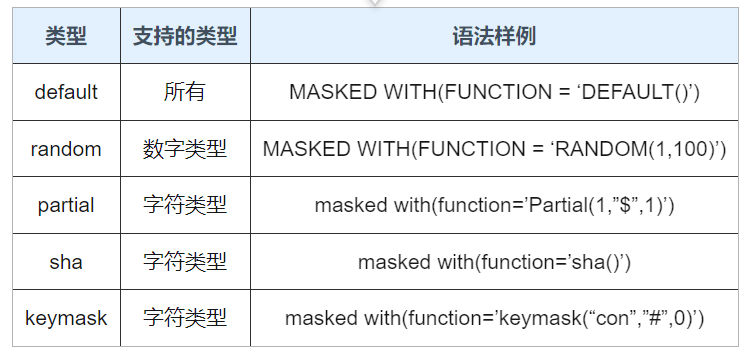
2、脱敏功能示例
2.1、DEFAULT 类型
没有参数,是针对基本类型的数据列进行脱敏的,为默认脱敏函数。
设置方式:MASKED WITH(FUNCTION = ‘DEFAULT()’)
在该种模式下:

1、若数据类型包含 date、datetime 和 time:
date 会以“1900-01-01”显示;
datetime 会以“1900-01-01 00:00:00”显示;
time 会以“00:00:00”显示。

2、若数据类型是整型、浮点型和 decimal:
整型和浮点型会显示 0;
decimal 会显示为 0.000…, 带有结果小数位(定义的类型或者评估
的类型)个数 0。

3、若数据类型是字符串类型的:
将会替换为固定4个X字符“XXXX”。

4、NULL 值:
不做脱敏处理,显示为NULL。

5、Sql 函数:
如果任一参数含有脱敏属性,则按照结果类型,执行默认脱敏。如果只参与条件部分,结果部分不包含脱敏列,则不脱敏,比如case when 的条件部分。

default样例

create table testMask(
    id int                  masked with(function='default()'),
    name varchar(100)       masked with(function='default()'),
    birth date              masked with(function='default()'),
    salary decimal(16,3)    masked with(function='default()'),
    luckynumber bigint      masked with(function='default()'));

insert into testmask values
    (1,'First','2001-01-01',1111.111,111111111111),
    (2,'Second','2002-02-02',2222.222,222222222222),
    (3,'张三','2003-03-03',3333.333,333333333333),
    (4,'李四','2004-04-04',4444.444,444444444444),
    (5,'大刀王五','2005-05-05',5555.555,555555555555);


gbase> select * from testmask;
+------+--------------+------------+----------+--------------+
| id   | name         | birth      | salary   | luckynumber  |
+------+--------------+------------+----------+--------------+
|    1 | First        | 2001-01-01 | 1111.111 | 111111111111 |
|    2 | Second       | 2002-02-02 | 2222.222 | 222222222222 |
|    3 | 张三         | 2003-03-03 | 3333.333 | 333333333333 |
|    4 | 李四         | 2004-04-04 | 4444.444 | 444444444444 |
|    5 | 大刀王五     | 2005-05-05 | 5555.555 | 555555555555 |
+------+--------------+------------+----------+--------------+

创建用户并授权
gbase> create user  wang@'%'  identified by  '123';
gbase> grant select,update,insert,delete on vc1.test.* to wang@'%' ;

gbase> gccli -uwang -p123
+------+------+------------+--------+-------------+
| id   | name | birth      | salary | luckynumber |
+------+------+------------+--------+-------------+
|    0 | xxxx | 1900-01-01 |  0.000 |           0 |
|    0 | xxxx | 1900-01-01 |  0.000 |           0 |
|    0 | xxxx | 1900-01-01 |  0.000 |           0 |
|    0 | xxxx | 1900-01-01 |  0.000 |           0 |
|    0 | xxxx | 1900-01-01 |  0.000 |           0 |
+------+------+------------+--------+-------------+
2.2、RANDOM 类型
RANDOM(min,max)有两个参数标定随机范围,最小值和最大值随机脱敏函数只对数字类型起作用,
它将会随机显示某一个范围内的值,并多次执行,但同一行的随机值会不同。

1、对 NULL 值不做处理,依然显示为 NULL。
2、min 数值必须小于 max。

Random数据类型范围:
Random只对数字类型(int系列,decimal)有效,对字符串,日期等会报错。


gbase> create table testMaskRandom(
    ->     id int                  masked with(function='random(1,10)'),
    ->     name varchar(100)       masked with(function='random(20,30)'),
    ->     birth date              masked with(function='random(40,50)'),
    ->     salary decimal(16,3)    masked with(function='random(60,70)'),
    ->     luckynumber bigint      masked with(function='random(80,90)')
    -> );
ERROR 1210 (HY000): Incorrect arguments to The data type of column 'name' does not support data masking function 'random'.


1、创建表、并插入数据。
create table testMaskRandom(
id int                  masked with(function='random(1,10)'),
name varchar(100)       ,
birth date              ,
salary decimal(16,3)    masked with(function='random(60,70)'),
luckynumber bigint      masked with(function='random(80,90)'));


insert into testMaskRandom values
(1,'First','2001-01-01',1111.111,111111111111),
(2,'Second','2002-02-02',2222.222,222222222222),
(3,'张三','2003-03-03',3333.333,333333333333),
(4,'李四','2004-04-04',4444.444,444444444444),
(5,'大刀王五','2005-05-05',5555.555,555555555555);

2、查询数据。
random每次执行结果都不一样。
不影响查询条件和函数计算等,脱敏只对最终返回的结果有效。

[gbase@rh6-1 ~]$ gccli -uwang -p123 -e"select * from testdb.testmaskrandom"
+------+--------------+------------+--------+-------------+
| id   | name         | birth      | salary | luckynumber |
+------+--------------+------------+--------+-------------+
|    6 | First        | 2001-01-01 | 66.254 |          84 |
|    4 | Second       | 2002-02-02 | 63.583 |          88 |
|    8 | 张三         | 2003-03-03 | 67.809 |          84 |
|    8 | 李四         | 2004-04-04 | 67.991 |          85 |
|    4 | 大刀王五     | 2005-05-05 | 68.429 |          83 |
+------+--------------+------------+--------+-------------+

[gbase@rh6-1 ~]$ gccli -uwang -p123 -e"select * from testdb.testmaskrandom"
+------+--------------+------------+--------+-------------+
| id   | name         | birth      | salary | luckynumber |
+------+--------------+------------+--------+-------------+
|    5 | First        | 2001-01-01 | 68.080 |          88 |
|    6 | Second       | 2002-02-02 | 61.481 |          82 |
|    8 | 张三         | 2003-03-03 | 60.335 |          89 |
|    5 | 李四         | 2004-04-04 | 66.832 |          90 |
|    8 | 大刀王五     | 2005-05-05 | 67.511 |          86 |
+------+--------------+------------+--------+-------------+

[gbase@rh6-1 ~]$ gccli -uwang -p123  -e"select * from testdb.testmaskrandom where salary=1111.111"
+------+-------+------------+--------+-------------+
| id   | name  | birth      | salary | luckynumber |
+------+-------+------------+--------+-------------+
|    1 | First | 2001-01-01 | 60.464 |          81 |
+------+-------+------------+--------+-------------+
2.3、PARTIAL类型
PARTIAL(prefix,padding,suffix),有三个参数:

prefix 表示前缀保留显示字符数量;
padding 表示脱敏显示字符;
suffix 表示结尾保留显示字符数量。

如果实际内容长度小于等于prefix+suffix+length(padding)长度,则直接显示 padding 的字符内容。

1、对 NULL 不做脱敏处理,显示为 NULL;
2、prefix 和 suffix 为大于等于 0 的整数
3、设置方式:MASKED WITH(FUNCTION = ‘PARTIAL(1,”XXXX”,1)’)

PARTIAL数据类型范围:
支持字符串,对数字、日期类型,不支持。

partial样例

create table testMaskPartial(
id int,
name varchar(100)       masked with(function='Partial(1,"$",1)'),
birth date,
salary decimal(16,3),
luckynumber bigint);


insert into testMaskPartial values
(1,'First','2001-01-01',1111.111,111111111111),
(2,'Second','2002-02-02',2222.222,222222222222),
(3,'张三','2003-03-03',3333.333,333333333333),
(4,'李四','2004-04-04',4444.444,444444444444),
(5,'大刀王五','2005-05-05',5555.555,555555555555);


gbase> select * from testMaskPartial;
+------+--------------+------------+----------+--------------+
| id   | name         | birth      | salary   | luckynumber  |
+------+--------------+------------+----------+--------------+
|    1 | First        | 2001-01-01 | 1111.111 | 111111111111 |
|    2 | Second       | 2002-02-02 | 2222.222 | 222222222222 |
|    3 | 张三         | 2003-03-03 | 3333.333 | 333333333333 |
|    4 | 李四         | 2004-04-04 | 4444.444 | 444444444444 |
|    5 | 大刀王五     | 2005-05-05 | 5555.555 | 555555555555 |
+------+--------------+------------+----------+--------------+


[gbase@rh6-1 ~]$ gccli -umasked -pmasked -e"select * from testdb.testmaskpartial"
+------+---------+------------+----------+--------------+
| id   | name    | birth      | salary   | luckynumber  |
+------+---------+------------+----------+--------------+
|    1 | F$t     | 2001-01-01 | 1111.111 | 111111111111 |
|    2 | S$d     | 2002-02-02 | 2222.222 | 222222222222 |
|    3 | $       | 2003-03-03 | 3333.333 | 333333333333 |
|    4 | $       | 2004-04-04 | 4444.444 | 444444444444 |
|    5 | 大$五   | 2005-05-05 | 5555.555 | 555555555555 |
+------+---------+------------+----------+--------------+
2.4、SHA 类型
做SHA加密计算。
对 NULL 不做处理,显示为 NULL。

设置方式
MASKED WITH(FUNCTION = ‘SHA()’)

sha数据类型范围
字符串类型。其它类型报错。
gbase> create table testMaskSHA(
    ->     id int                  masked with(function='sha()'),
    ->     name varchar(100)       masked with(function='sha()'),
    ->     birth date              masked with(function='sha()'),
    ->     salary decimal(16,3)    masked with(function='sha()'),
    ->     luckynumber bigint      masked with(function='sha()'));
ERROR 1210 (HY000): Incorrect arguments to The data type of column 'id' does not support data masking function 'sha'.


sha样例:
create table testMaskSHA(
id int,
name varchar(100)       masked with(function='sha()'),
birth date,
salary decimal(16,3),
luckynumber bigint);


insert into testMaskSHA values
(1,'First','2001-01-01',1111.111,111111111111),
(2,'Second','2002-02-02',2222.222,222222222222),
(3,'张三','2003-03-03',3333.333,333333333333),
(4,'李四','2004-04-04',4444.444,444444444444),
(5,'大刀王五','2005-05-05',5555.555,555555555555);

gbase> select * from testMaskSHA;
+------+--------------+------------+----------+--------------+
| id   | name         | birth      | salary   | luckynumber  |
+------+--------------+------------+----------+--------------+
|    1 | First        | 2001-01-01 | 1111.111 | 111111111111 |
|    2 | Second       | 2002-02-02 | 2222.222 | 222222222222 |
|    3 | 张三         | 2003-03-03 | 3333.333 | 333333333333 |
|    4 | 李四         | 2004-04-04 | 4444.444 | 444444444444 |
|    5 | 大刀王五     | 2005-05-05 | 5555.555 | 555555555555 |
+------+--------------+------------+----------+--------------+


[gbase@rh6-1 ~]$ gccli -umasked -pmasked -e"select * from testdb.testmasksha"
+------+------------------------------------------+------------+----------+--------------+
| id   | name                                     | birth      | salary   | luckynumber  |
+------+------------------------------------------+------------+----------+--------------+
|    1 | 916a78d701ded328cd66da58a97ef8cd28a99e84 | 2001-01-01 | 1111.111 | 111111111111 |
|    2 | 2a4bcae654f264daf22579fb462bf0bae302a057 | 2002-02-02 | 2222.222 | 222222222222 |
|    3 | ced07fb42b05a2ed9efa330250e2bb9175f962ce | 2003-03-03 | 3333.333 | 333333333333 |
|    4 | b7b286678338a2092572733e23236485d166c0df | 2004-04-04 | 4444.444 | 444444444444 |
|    5 | 393b73dba6e95c7487be4e175dc1d37ace4a5480 | 2005-05-05 | 5555.555 | 555555555555 |
+------+------------------------------------------+------------+----------+--------------+
2.5、keymask自定义脱敏函数
keymask(substr,padding,pos)

功能:指定字符为初始计数位置,指定位数内脱敏功能。

keymask数据类型范围
keymask脱敏函数只用于varchar/char列进行脱敏,其他类型列使用该函数将报错返回。

substr:要找到的字符串
padding:替换成的字符
pos: 0/1 覆盖方向,0表示向前覆盖,1表示向后覆盖


kekeymask样例
create table testMaskKeymask(
id int,
name varchar(100)       masked with(function='keymask("con","#",0)'),
birth date,
salary decimal(16,3),
luckynumber bigint);


insert into testMaskKeymask values
(1,'First','2001-01-01',1111.111,111111111111),
(2,'Second','2002-02-02',2222.222,222222222222),
(3,'张三','2003-03-03',3333.333,333333333333),
(4,'李四','2004-04-04',4444.444,444444444444),
(5,'大刀王五','2005-05-05',5555.555,555555555555);


gbase> select * from testMaskKeymask;
+------+--------------+------------+----------+--------------+
| id   | name         | birth      | salary   | luckynumber  |
+------+--------------+------------+----------+--------------+
|    1 | First        | 2001-01-01 | 1111.111 | 111111111111 |
|    2 | Second       | 2002-02-02 | 2222.222 | 222222222222 |
|    3 | 张三         | 2003-03-03 | 3333.333 | 333333333333 |
|    4 | 李四         | 2004-04-04 | 4444.444 | 444444444444 |
|    5 | 大刀王五     | 2005-05-05 | 5555.555 | 555555555555 |
+------+--------------+------------+----------+--------------+


[gbase@rh6-1 ~]$ gccli -umasked -pmasked -e"select * from testdb.testmaskkeymask where name='Second'"
+------+-------+------------+----------+--------------+
| id   | name  | birth      | salary   | luckynumber  |
+------+-------+------------+----------+--------------+
|    2 | #cond | 2002-02-02 | 2222.222 | 222222222222 |
+------+-------+------------+----------+--------------+

[gbase@rh6-1 ~]$ gccli -umasked -pmasked -e"select * from testdb.testmaskkeymask"
+------+--------------+------------+----------+--------------+
| id   | name         | birth      | salary   | luckynumber  |
+------+--------------+------------+----------+--------------+
|    1 | First        | 2001-01-01 | 1111.111 | 111111111111 |
|    2 | #cond        | 2002-02-02 | 2222.222 | 222222222222 |
|    3 | 张三         | 2003-03-03 | 3333.333 | 333333333333 |
|    4 | 李四         | 2004-04-04 | 4444.444 | 444444444444 |
|    5 | 大刀王五     | 2005-05-05 | 5555.555 | 555555555555 |
+------+--------------+------------+----------+--------------+
3、GBase 8a脱敏管理操作
3.1、修改脱敏属性
支持创建表时直接指定脱敏列,也可以后期随时修改脱敏算法。如果以前没有,则时增加了脱敏属性。
gbase> alter table testdb.testmasksha alter salary masked with(function='default()');
3.2、删除脱敏属性
语法如下:
alter table TABLENAME alter 列名 drop masked;
3.3、脱敏权限管理
默认没有unmask权限的用户,都只能看到脱敏后的数据。
管理员用户root和gbase不受此限制。默认有所有权限。

gbase> create user wang identified by '123';
gbase> grant unmask,select,insert,delete,update on testdb.* to wang;
[gbase@rh6-1 ~]$ gccli -uwang -p123
gbase> use testdb;
gbase> select * from testmask;
+------+--------------+------------+
| id   | name         | birth      |
+------+--------------+------------+
|    1 | First        | 2001-01-01 |
|    2 | Second       | 2002-02-02 |
|    3 | 张三         | 2003-03-03 |
|    4 | 李四         | 2004-04-04 |
|    5 | 大刀王五     | 2005-05-05 |
+------+--------------+------------+热门帖子
- 12025-12-01浏览数:182764
- 22023-05-09浏览数:25062
- 42023-09-25浏览数:18526
- 52020-05-11浏览数:17529