Gbase 运维-表空洞率自动清理
表空洞率问题及解决方案
背景:
由于数据库所使用的磁盘空间有限,用户在使用过程中,可能会删掉历史较早的数据,以便腾出磁盘空间来使用,但是在8a 数据库中,表中的部分数据在被删除之后,数据并不会真正的删除,而是在元数据信息里面标记被删除的行,引出两个问题:一,磁盘空间并没有被回收; 二,空洞率较高的表查询浪费资源,影响性能。
为了解决这个问题,数据库有命令alter table t1 shrink space 【option】 支持使用,但是什么时候使用? select * from performance_schema.tables where TABLE_SCHEMA = 'test ' and TABLE_NAME = 'test1 '; 表查询出的空洞率值8.3以前的版本值也会不准两个问题,现给出如下方案;
解决方案:
计算出空洞率,输出表空洞率,占用空间,有效数据空间等指标,给出一个信息表,人工判断或者脚本判断是否回收表空间,然后进行表空间回收,回收可以使用alter table t1 shrink space 【option】,或者 新建表,select 原始表,insert into 表, delet 原始表,rename 新表的方式进行。
计算空洞率
linux 脚本实现读取服务器主机里数据库的表的文件实际占用空间;
数出表中有效数据行数,估算出表有效行的数据占用的空间;
用实际占用空间减去估算的空间,除以实际占用空间得到数据的空洞率。
判断指标定义:
根据数据磁盘空间情况以及表情况进行判断。目前磁盘40T空间80%的使用率情况下,
Picccog 的表有100多张, 一张表5g的空洞空间将是不能接受的,并且考虑到空间清理需要耗费资源已经锁表等情况。
因此暂定:大表:条件:存储空间大于:500G 可释放空间大于75G 空洞率大于15%
小表:条件:存储空间小于500G 可释放空间大于5G 空洞率大于30%
执行时机:
由于shrink space功能是ddl操做,执行期间会阻塞对该表的查询和DML、DDL操作(采用rebalance方式做shrink时可以放松部分限制如可以进行select查询、load、insert select等追加操作,但仍会阻塞update和delete操作),因此会对业务产生影响,需要选择窗口期进行释放空间执行。定时任务在晚上9点之后执行,执行时间在几分钟到几十分钟不等,最多执行两个表,在12点之前执行完毕,避免大批量数据同步的执行。
实现:
1.新建一个存储表存储计算得到的空洞率等指标信息:
create table if not exists picccog.shrink_ratio (
dbname               varchar(512)  comment '库名'
,tbname                  varchar(512)  comment '表名'
,one_dc_disk_size    varchar(512)  comment '一个dc空间大小'
,current_disk_size       varchar(512)  comment '表当前占用磁盘空间大小,单位:字节'
,record_count        varchar(512)  comment '当前有效数据行数'
,calc_disk_size          varchar(512)  comment '估算的有效数据占用的空间大小'
,can_release_disk_size   varchar(512)  comment '能够释放的磁盘空间大小'
,rate                 varchar(512) comment '空洞率'
,check_datetime      varchar(512)  comment '空洞率检查时间'
) ENGINE=EXPRESS DEFAULT CHARSET=utf8 TABLESPACE='sys_tablespace' COMMENT='空洞率查询记录表';
2. Shell 脚本实现空洞率等指标的计算,命文件名为shrink_space_show.sh :
dbname=$1
for tbname_no_tail in `gccli -ugbase -p#### -e"use ${dbname}; show tables;" | awk 'NR>1'`
do
 tbname_no_tail=$tbname_no_tail
 tbname=${tbname_no_tail}_n1

 echo check table ${dbname}.${tbname_no_tail}

  #判断文件是否存在
 data_path=${GBASE_BASE}/userdata/gbase/${dbname}/sys_tablespace/${tbname}
  if [ ! -d ${data_path} ]; then
   echo "${dbname}.${tbname} not exists at ${data_path}"
  fi

  # 每个列的一个DC大小占用的磁盘容量总计
 one_dc_size=0

  for segname in `ls ${data_path}/ |cut -d\. -f 1 |uniq`
  do
   echo -n Checking $segname' ';
    # 多个segment选择最新的评估
   tmpname=`ls ${data_path}/${segname}.* -t | head -n 1`
   size=`metadump ${tmpname}|grep total_size|cut -d',' -f 2`;
   echo -e "\t"${size}
 #  echo ${size};
   let one_dc_size+=size;
 #  echo sum=${total};
 #  echo sum=${total};
 done

  if [ ${one_dc_size} -le 0 ]; then
   echo "no data file found in ${data_path}";
  fi

 echo one_dc_disk_size=${one_dc_size}

  # 当前数据文件大小合计(单位bit)
 current_Size=0
 current_Size=`ls  -lt ${data_path} | head -n 1 | cut -d' ' -f 2`
  let current_Size*=1024
 echo current_disk_size=${current_Size}

  # 表总行数
 count=0
 count=`gncli -ugbase -p#### -e"select count(1) from ${dbname}.${tbname}" -N`
 echo record_count=${count}

  # 计算理论磁盘占用
  let calc_size=count*one_dc_size/65536
 echo calc_disk_size=${calc_size}

  # 可释放空间
  let release=current_Size-calc_size
 echo can_release_disk_size=${release}

  # 比例
  if [ ${release}S -gt 0 ]; then
  let rate=release*100/current_Size
 echo can_relese_disk_rate=${rate}%
 else
 echo can_relese_disk_rate=0%
  fi
 echo ------------------------------------------------------------------------
 echo ------------------------------------------------------------------------
done
# 如果大于阈值,则插入相关数据信息,以便清理空间的任务。
  if [ $rate -ge 15 -a $release -ge 75000000000 ];
 then
   echo table=${dbname}.${tbname_no_tail} need to shrink space;
       echo one_dc_disk_size=${one_dc_size}
       echo current_disk_size=${current_Size}
       echo record_count=${count}
       echo calc_disk_size=${calc_size}
       echo can_release_disk_size=${release}
       echo can_relese_disk_rate=${rate}%
       current_timestamp=`gccli -ugbase -p${密码} -e"select current_timestamp;" -N`
   shrink_sql_result=`gccli -ugbase -p${密码} -e"delete from test.shrink_ratio where dbname='${dbname}' and tbname='${tbname}';insert into test.shrink_ratio values('${dbname}','${tbname_no_tail}','${one_dc_size}','${current_Size}','${count}','${calc_size}','${release}','${rate}','${current_timestamp}');"`
   echo $shrink_sql_result
  else
   echo ${dbname}.${tbname_no_tail} don\'t need to shrink space;
  fi

 echo ------------------------------------------------------------------------
  echo ------------------------------------------------------------------------
done
3.执行nohup sh /home/gbase/script/space_show.sh picccog >> /tmp/space_show_.log 2>&1 & 执行脚本,可以把信息输出表日志里面,查看空洞率相关信息,也可以在查表 test.shrink_ratio 查看表信息。
输入不同库参数,可以检查不同库下所有表的空洞率情况。
定时任务在跑业务数据的空窗期,实现空洞率的处理,并记录处理的情况跟执行前情况到日志表:
   create table if not exists picccog.table_shrink_space_info (
dbname               varchar(512)  comment '库名'
,tbname                  varchar(512)  comment '表名'
,front_disk_size     varchar(512)  comment '清理前占用磁盘空间大小,单位:字节'
,current_disk_size       varchar(512)  comment '表当前占用磁盘空间大小,单位:字节'
,front_record_count      varchar(512)  comment '清理前有效数据行数'
,record_count        varchar(512)  comment '当前有效数据行数'
,front_calc_disk_size           varchar(512)  comment '清理前估算的有效数据占用的空间大小,单位:字节'
,front_can_release_disk_size    varchar(512)  comment '清理前能够释放的磁盘空间大小,单位:字节'
,front_rate              varchar(512)  comment '清理前空洞率'
,current_rate        varchar(512)  comment '空洞率'
,front_check_datetime       varchar(512)  comment '清理前空洞率检查时间'
,current_check_datetime  varchar(512)  comment '当前空洞率检查时间'
,shrink_start_time     varchar(512)  comment'清理开始时间'
,shrink_end_time       varchar(512)  comment'清理结束时间'
,shrink_sum_time      varchar(512)  comment'清理总时长。单位:秒'
) ENGINE=EXPRESS  DEFAULT CHARSET=utf8 TABLESPACE='sys_tablespace' COMMENT='空洞率查询记录表';
实现脚本如下:
source /home/gbase/.gbase_profile

enviroment_dbname=picccog

for od in $(seq 1 2)
do
startTime=`date '+%Y-%m-%d %H:%M:%S'`
startTime_s=`date +%s`

#循环获取${enviroment_dbname}.shrink_ratio表排序第一/第二的表:
first_table=`gccli -ugbase -p#### -e"select tm.dbname ,tm.tbname from ( select t1.dbname ,t1.tbname ,t2.tbname as tbname_t2,t1.can_release_disk_size,t1.rate,row_number() over(order by can_release_disk_size desc ,rate desc) as rn  from ${enviroment_dbname}.shrink_ratio t1 left join ${enviroment_dbname}.table_shrink_space_info t2 on t1.dbname = t2.dbname and t1.tbname = t2.tbname and substring(t2.shrink_end_time,1,7) = substring(t1.check_datetime,1,7) where t2.tbname is null) tm where tm.rn =${od} ;" -N`

dbname=`echo $first_table |awk '{split($1, arr , " "); print arr[1]}'`
tbname_no_tail=`echo $first_table |awk '{split($2, arr , " "); print arr[1]}'`

tbname=${tbname_no_tail}_n1
echo table ${dbname}.${tbname_no_tail} shrink table space

#处理空间清理:
gccli -ugbase -p#### -e"alter table ${dbname}.${tbname_no_tail} shrink space full";

echo check table ${dbname}.${tbname_no_tail}

#判断文件是否存在
current_check_time=`date '+%Y-%m-%d %H:%M:%S'`
data_path=${GBASE_BASE}/userdata/gbase/${dbname}/sys_tablespace/${tbname}
if [ ! -d ${data_path} ]; then
 echo "${dbname}.${tbname} not exists at ${data_path}"
fi

# 每个列的一个DC大小占用的磁盘容量总计
one_dc_size=0

for segname in `ls ${data_path}/ |cut -d\. -f 1 |uniq`
do
  echo -n Checking $segname' ';
  # 多个segment选择最新的评估
 tmpname=`ls ${data_path}/${segname}.* -t | head -n 1`
 size=`metadump ${tmpname}|grep total_size|cut -d',' -f 2`;
 echo -e "\t"${size}
# echo ${size};
  let one_dc_size+=size;
# echo sum=${total};
# echo sum=${total};
done

if [ ${one_dc_size} -le 0 ]; then
 echo "no data file found in ${data_path}";
fi

# 当前数据文件大小合计(单位bit)
current_Size=0
current_Size=`ls  -lt ${data_path} | head -n 1 | cut -d' ' -f 2`
let current_Size*=1024

# 表总行数
count=0
count=`gncli -ugbase -p#### -e"select count(1) from ${dbname}.${tbname}" -N`

# 计算理论磁盘占用
let calc_size=count*one_dc_size/65536

# 可释放空间
let release=current_Size-calc_size

# 比例
if [ ${release} -gt 0 -a ${current_Size} -gt 0 ]; then
let rate=release*100/current_Size
else
rate=0
fi

# 展示相关数据信息,以便确认清理空间的任务。
echo one_dc_disk_size=${one_dc_size}
echo current_disk_size=${current_Size}
echo record_count=${count}
echo calc_disk_size=${calc_size}
echo can_release_disk_size=${release}
echo can_relese_disk_rate=${rate}%

endTime=`date '+%Y-%m-%d %H:%M:%S'`
endTime_s=`date +%s`

sumTime=$[ $endTime_s - $startTime_s ]

echo "$startTime ---> $endTime" "Total:$sumTime seconds"

#插入日志表相关数据
gccli -ugbase -p#### -vvv -D${dbname} <<EOF
insert into ${enviroment_dbname}.table_shrink_space_info
select
dbname
,tbname
,round(current_disk_size/1024/1024/1024,4) as front_disk_size
,round(${current_Size}/1024/1024/1024,4) as current_disk_size
,record_count as front_record_count
,${count} as record_count
,round(calc_disk_size/1024/1024/1024,4) as front_calc_disk_size
,round(can_release_disk_size/1024/1024/1024,4) as front_can_release_disk_size
,rate as front_rate
,${rate} as current_rate
,check_datetime as front_check_datetime
,'${current_check_time}' as current_check_datetime
,'${startTime}' as shrink_start_time
,'${endTime}' as shrink_end_time
,${sumTime} as shrink_sum_time
from ${enviroment_dbname}.shrink_ratio
where dbname = '${dbname}' and tbname = '${tbname_no_tail}';
EOF

echo ------------------------------------------------------------------------
echo ------------------------------------------------------------------------
done
4.crontab -e 进入定时任务编辑如:
 00 19 * * * sh /home/gbase/script/space_show.sh picccog >> /tmp/space_show_.log 2>&1  &   #检查picccog库下表的空洞率
 40 18 * * * sh /home/gbase/script/space_show_piccyx.sh piccyx >> /tmp/space_show_.log 2>&1 &     #检查piccyx库下表的空洞率
 03 21 * * * sh /home/gbase/script/shrink_space_table.sh >> /tmp/shrink_space_table.log 2>&1 &   #执行表的空洞率清理操作并记录
运行效果:
执行前检查库表记录:
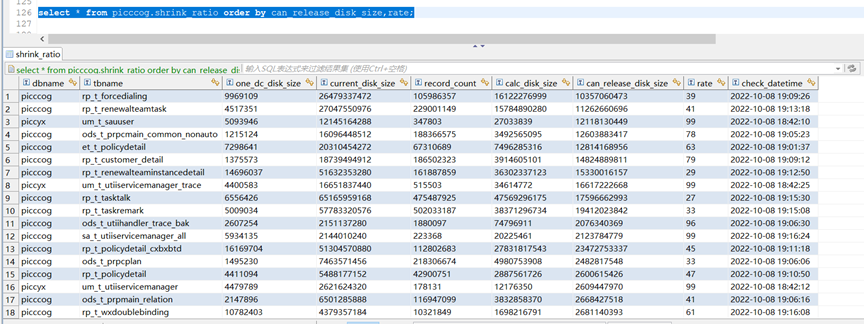
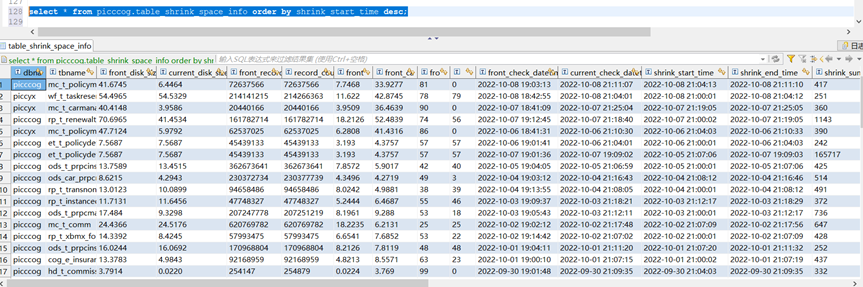
执行后记录结果:
附录:
空洞率的检查脚本,引用了老紫竹的博客,出处:

热门帖子
- 12025-12-01浏览数:183891
- 22023-05-09浏览数:26561
- 42023-09-25浏览数:20254
- 52020-05-11浏览数:19042
感谢分享!