GBase 8a
性能调优
文章
gbase 8a 86版本表空洞率
发表于2024-03-29 13:45:48630次浏览2个评论
一、原理和场景
GBase 8a数据库在数据被删除时,并没有释放磁盘空间,而是只打了一个【已删除】的标记。,这就会导致有效数据,在磁盘上是不连续的,其比例就是空洞率。 在大数据场景,少量空洞是可以接受的,但如果已经对性能有了实质影响,则需要进行shrink space收缩空间,甚至重建表来解决空洞现象。而本文介绍怎么在gbase 8a 86环境下查看表的空洞率情况。
二、检查空洞率脚本
#!/bin/bash
source /home/gbase/.gbase_profile
#获取工作目录
workspace=$(cd `dirname $0`;pwd)
#执行脚本所在节点IP
nodeIP=172.16.9.174
#kong存储表所在的库
kong_db=test
gccli_command='gccli -uroot'
sql="select t2.dbname,t2.tbname from gbase.table_distribution t2  where t2.dbname  not in ('replacenodes_temporary_db','information_schema','performance_schema','gbase','gctmpdb','gclusterdb') order by t2.dbname,t2.tbname"
${gccli_command} -Ns -e"$sql" > ${workspace}/kdong_db_table.lst
Mytime=$(date +%Y%m%d%H%M%S)
echo "${Mytime} start"

empty(){
    > ${workspace}/table_kdong.log
    while read dbname tbname
    do
      sql_kd="use performance_schema;select TABLE_SCHEMA,TABLE_NAME,DELETE_ROWS,TABLE_ROWS,DELETE_RATIO,$Mytime from TABLES where table_schema='${dbname}' and table_name='${tbname}'"
      $gccli_command -Ns -e "$sql_kd" >> ${workspace}/table_kdong.log
    done <kdong_db_table.lst
    sql_load_kd="load data infile 'file://${nodeIP}/${workspace}/table_kdong.log' into table ${kong_db}.kdong fields terminated by '\t';"
    $gccli_command -Ns -e "$sql_load_kd"
    distribution_Endtime=$(date +%Y%m%d%H%M%S)
    echo "${distribution_Endtime}  end"
}

empty
三、操作步骤
3.1 创建存储数据的库表
gccli -uroot -p

create database test;
use test;
create table kdong(
TABLE_SCHEMA varchar(64) DEFAULT NULL,
TABLE_NAME varchar(64) DEFAULT NULL,
DELETE_ROWS bigint(21) DEFAULT NULL,
TABLE_ROWS bigint(21) DEFAULT NULL,
DELETE_RATIO double DEFAULT NULL,
Mytime varchar(64) DEFAULT NULL);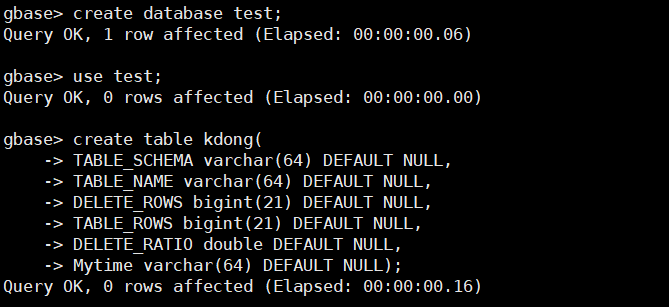
3.2 创建运行目录并执行脚本
执行脚本会产生两个文件,一为执行空洞查询的表名,二为空洞分布情况。
mkdir -p /home/gbase/work_space
cd /home/gbase/work_space
sh kdong_gbase_table_segment.sh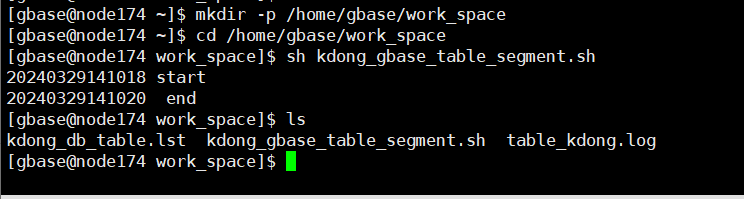
3.3查看表的空洞率
gccli -uroot -e "select * from test.kdong"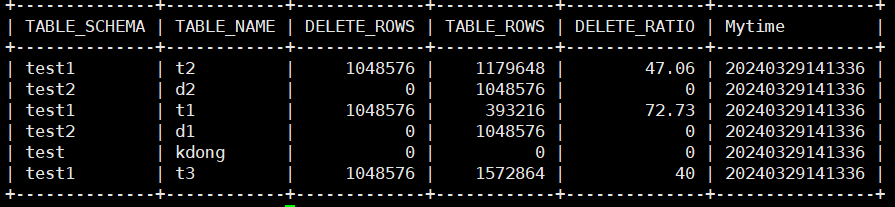
delete_rows代表表已删除的行,table_row代表表当前行数,delete_ratio代表表的空洞率。一般在表行数很多,并且空洞率很大的情况下需要对表进行处理。另外提供以下查询方法。
查询行数前二十表的空洞率
gccli -uroot -e "select * from gclusterdb.kdong order by TABLE_ROWS desc limit 20 "
查询空洞率前二十的表
gccli -uroot -e "select * from gclusterdb.kdong order by DELETE_RATIO  desc limit 20"
查询空洞率大于90%的表
gccli -uroot -e "select * from gclusterdb.kdong where DELETE_RATIO > 90 order by DELETE_RATIO desc "
3.4 对空洞率大的表进行处理
###seg数据文件级释放空间
alter table TTT shrink space
####行级释放空间
alter table TTT shrink space full
###DC级释放空间
alter table t shrink space full block_reuse_ratio=30
###重建表
lock tables t write;
creat table t_new like select * from t;
insert into t_new   select * from t;
unlock tables;
drop table t;
alter table t1 rename kdong;
3.5 truncate空洞存储表
每次执行完脚本,并处理完空洞率大的表,需要讲存储空洞率的表kdong清空,防止下次执行脚本产生重复数据。
gccli -uroot -e "truncate table test.kdong"评论
登录后才可以发表评论

GBase用户28017发表于 5个月前
学习。
GBase用户47954发表于 1个月前
感谢作者的精彩分享!
热门帖子
- 12025-12-01浏览数:182763
- 22023-05-09浏览数:25060
- 42023-09-25浏览数:18525
- 52020-05-11浏览数:17529