GBase 8s
适配迁移
问答
创建索引报错:Error message : The total size of the index is too large or too many parts in index.Write index has error!
发表于2025-07-18 10:35:35182次浏览20个评论
为提高效率,提问时请提供以下信息,问题描述清晰可优先响应。
【GBase版本】:8S
【操作系统】:CentOS 7.6
【CPU】:x86
【问题描述】*:创建索引报错:Error message : The total size of the index is too large or too many parts in index.Write index has error!
评论
登录后才可以发表评论

路路路发表于 1年前
稍等
GBase用户19659发表于 1年前
@路路路:等了一早上了
hugolin发表于 1年前
@GBase用户19659:这是索引长度超过了数据页大小的限制
是不是把库建到rootdbs了
select distinct t.dbsname database, d.name dbspace, t.tabname
from sysmaster:sysdbstab d,sysmaster:syschunks c,sysmaster:sysextents t
where t.chunk = c.chknum
and c.dbsnum=d.dbsnum
and t.dbsname not like 'sys%'
and t.dbsname != 'onpload'
and t.tabname not like 'sys%'
and d.name = 'rootdbs';
是不是把库建到rootdbs了
select distinct t.dbsname database, d.name dbspace, t.tabname
from sysmaster:sysdbstab d,sysmaster:syschunks c,sysmaster:sysextents t
where t.chunk = c.chknum
and c.dbsnum=d.dbsnum
and t.dbsname not like 'sys%'
and t.dbsname != 'onpload'
and t.tabname not like 'sys%'
and d.name = 'rootdbs';
GBase用户19659发表于 1年前
@hugolin:系统库在rootdbs,如图1;业务库在自己创建的表空间,如图2.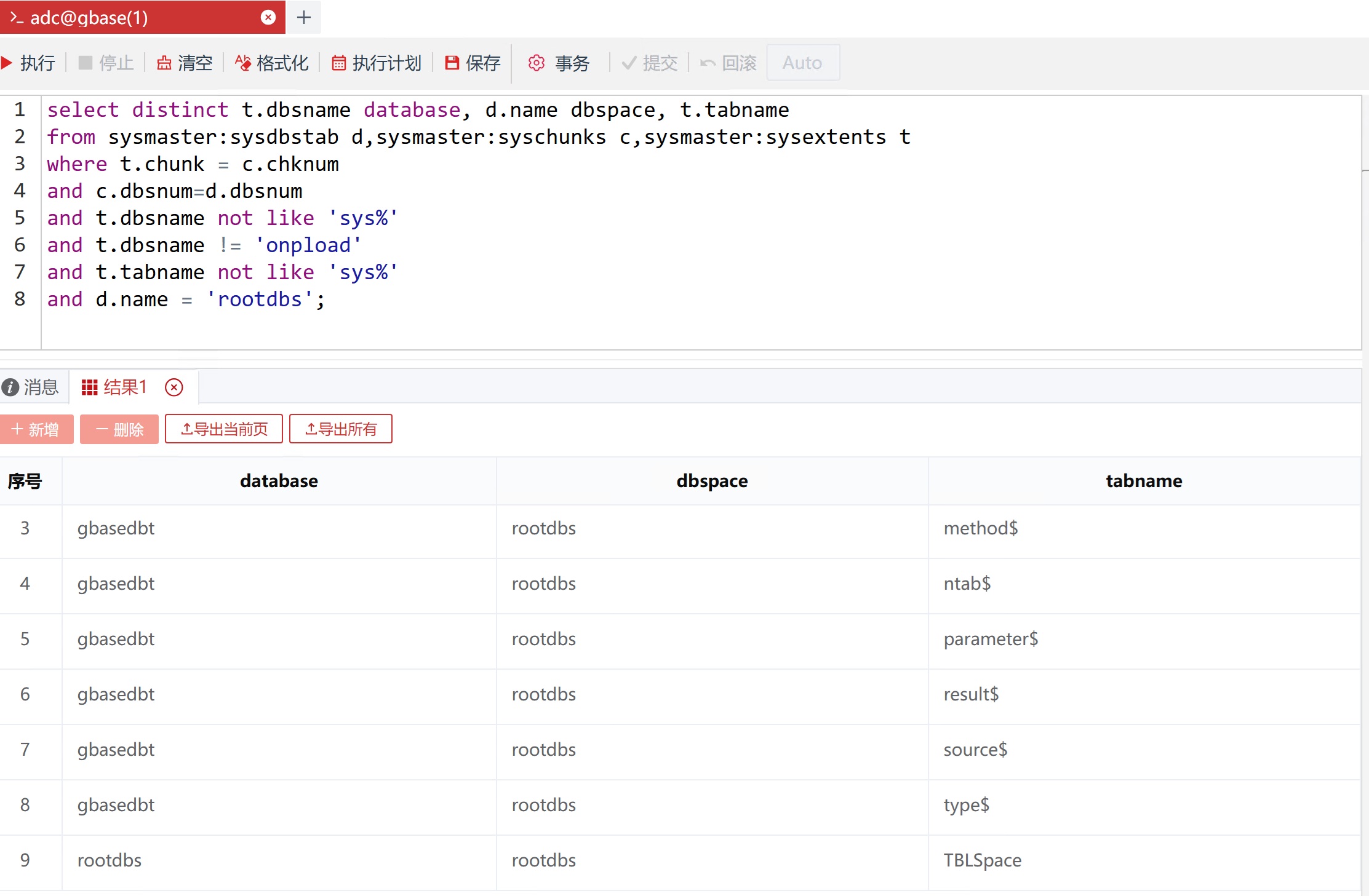
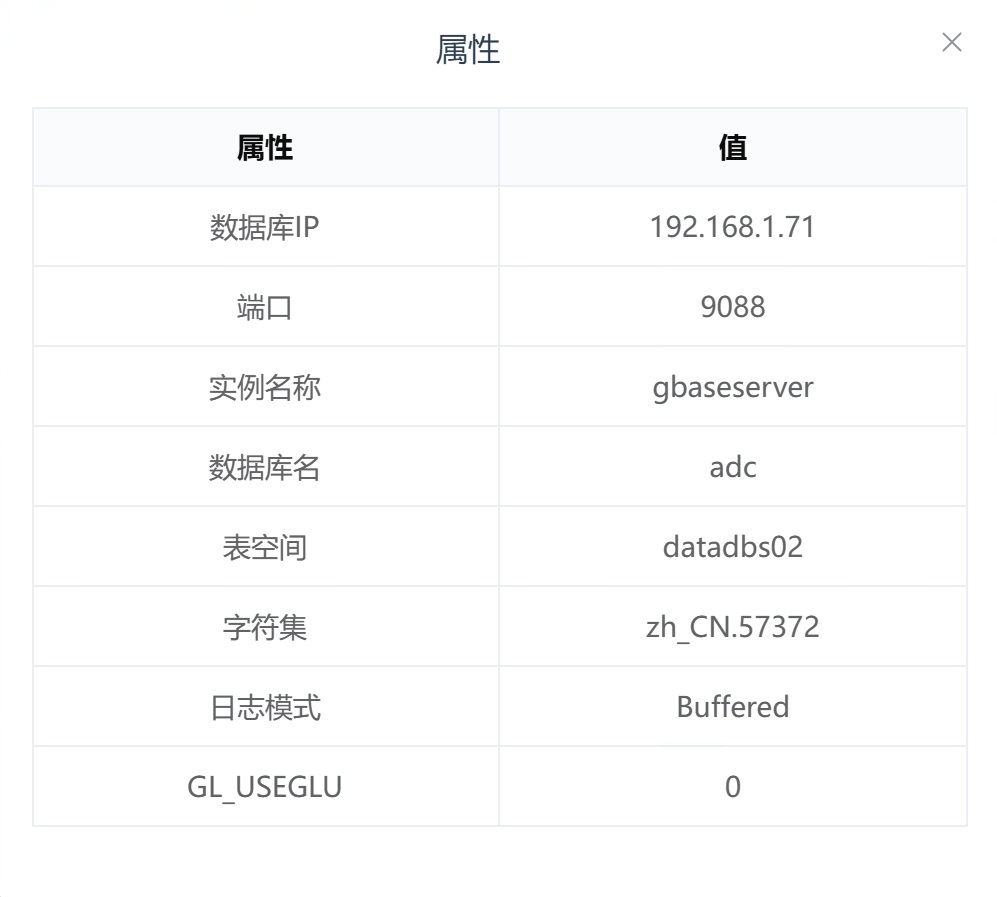
GBase用户19659发表于 1年前
@hugolin:系统库在rootdbs,如图1;业务库在自己建的表空间,如图2。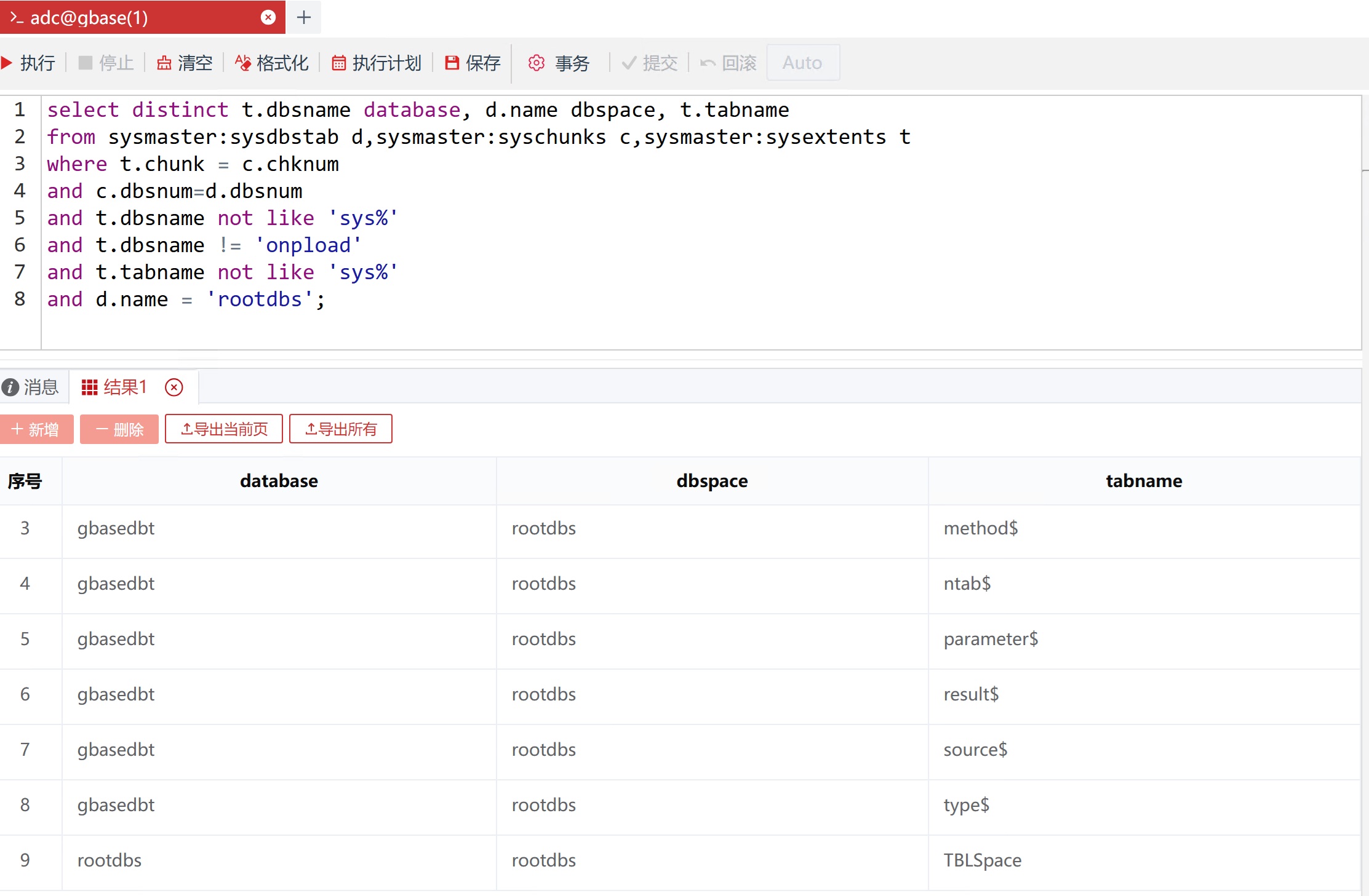
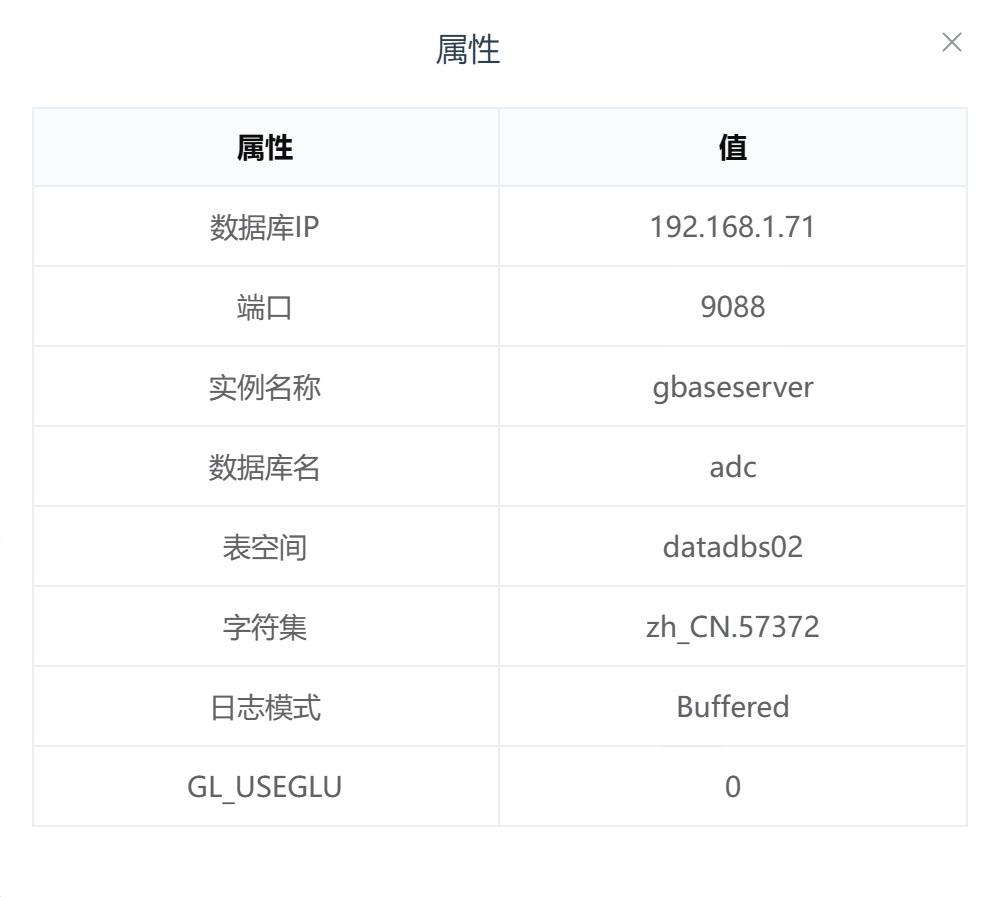
GBase用户19659发表于 1年前
@hugolin: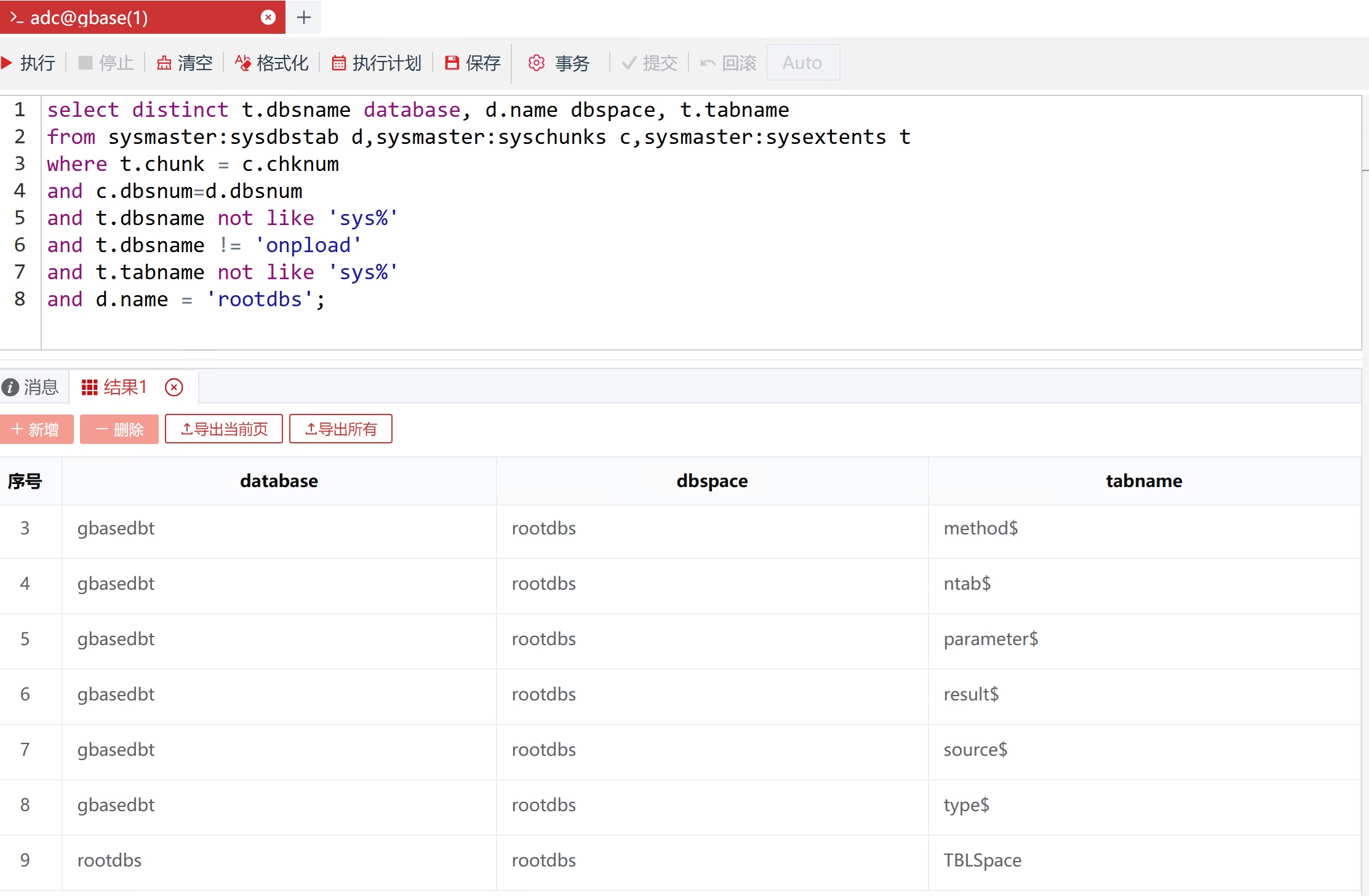
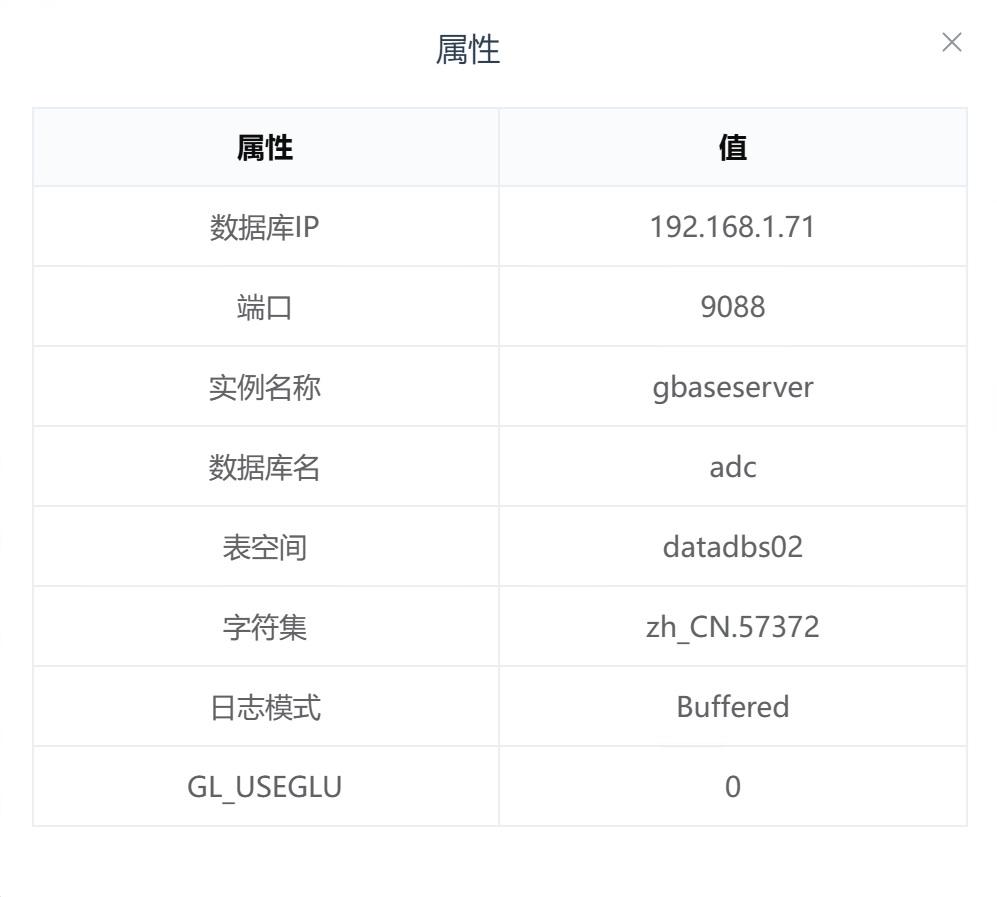
GBase用户19659发表于 1年前
@hugolin:系统库在rootdbs,业务库在自己创建的表空间;表空间的页大小默认是2048吗?出现这种问题是要修改表空间的页大小吗?页大小改到多大合适?
hugolin发表于 1年前
@GBase用户19659:创建表空间不指定页大小,默认是2k页
onspaces -c -d datadbs2 -p /data/gbasedbs/datadbs2 -o 0 -s 20480000 -k 16
-k 16指定使用16k页
onspaces -c -d datadbs2 -p /data/gbasedbs/datadbs2 -o 0 -s 20480000 -k 16
-k 16指定使用16k页
最佳回答
GBase用户19659发表于 1年前
@hugolin:换了其他页大小 添加表注释和列注释又开始报错:Error message : Code-set conversion function failed due to illegal sequence or invalid value.
hugolin发表于 1年前
@GBase用户19659:客户端工具或应用程序安装在中文目录,需要安装到英文目录下;
往英文字符集的数据库插入了中文字符,这种情况需要设置DB LOCALE,CLIENT LOCALE环境变量后重建库。
查询8s应用库字符集:
select * from sysmaster:sysdbslocale;
往英文字符集的数据库插入了中文字符,这种情况需要设置DB LOCALE,CLIENT LOCALE环境变量后重建库。
查询8s应用库字符集:
select * from sysmaster:sysdbslocale;
GBase用户19659发表于 1年前
@hugolin:客户端工具和应用程序都在英文目录下;8s应用库字符集查询结果:en_US.819。
hugolin发表于 1年前
@GBase用户19659:环境变量设置字符集,并重建库试试
export DB_LOCALE=zh_CN.utf8
export CLIENT_LOCALE=zh_CN.utf8
export DB_LOCALE=zh_CN.utf8
export CLIENT_LOCALE=zh_CN.utf8
GBase用户19659发表于 1年前
@hugolin:建库的时候选择utf8可以了,sql语句建库可以指定字符集吗?语法是啥样的
hugolin发表于 1年前
@GBase用户19659:gbasedbt用户下
vi .bash_profile
export DB_LOCALE=zh_CN.utf8
export CLIENT_LOCALE=zh_CN.utf8
加上后source .bash_profile使环境变量生效
创建库:
dbaccess - - <create database db_name in datadbs01 with log;
!
vi .bash_profile
export DB_LOCALE=zh_CN.utf8
export CLIENT_LOCALE=zh_CN.utf8
加上后source .bash_profile使环境变量生效
创建库:
dbaccess - - <create database db_name in datadbs01 with log;
!
GBase用户19659发表于 1年前
@hugolin:好吧 除了在环境变量里配置 那就只能在图像化界面选了
hugolin发表于 1年前
@GBase用户19659:可以新建一个16k页的数据空间,把库迁移到新空间里,或者创建索引指定空间名
create index idx_tab_col1 on tab(col1) in datadbs2;
create index idx_tab_col1 on tab(col1) in datadbs2;

山佳发表于 2个月前
学习了
GBase用户51882发表于 2个月前
学习下。
热门帖子
- 12025-12-01浏览数:182759
- 22023-05-09浏览数:25052
- 42023-09-25浏览数:18521
- 52020-05-11浏览数:17526