GBase 8s
适配迁移
文章
必需组件:
tomcat 7
数据库连接工具:
GBase 8s JDBC dbtjdbc_2.0.1a2_1.jar
开发环境:
Eclipse
配置前提
1,GBase 8s 数据库服务器已经正常启动
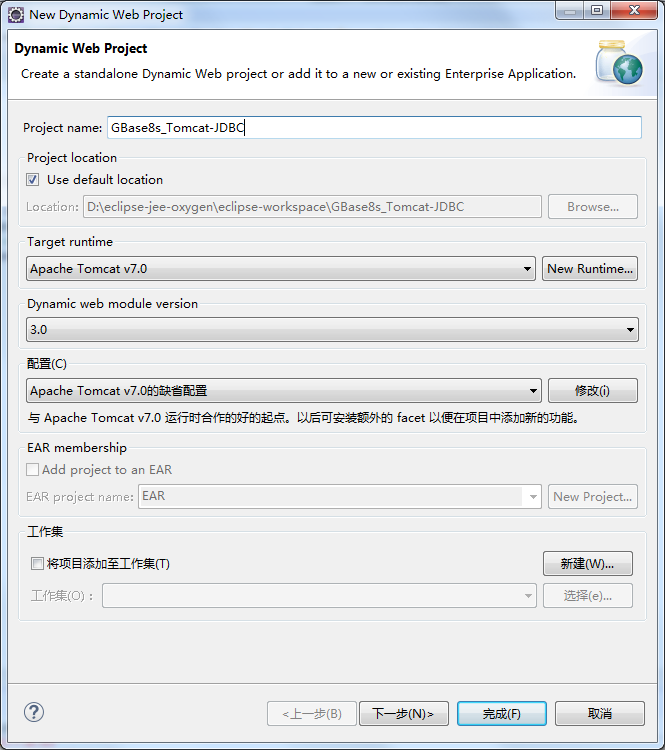
###1, 在eclipse环境中 新建 动态Web项目,使用Tomcat 7
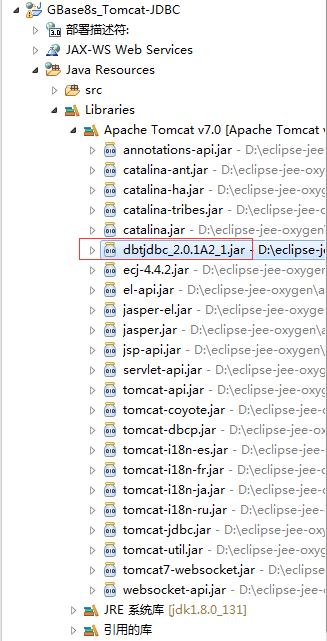
###2,将gbase 8s的jdbc jar包dbtjdbc_2.0.1a2_1.jar复制到tomcat的lib目录下。
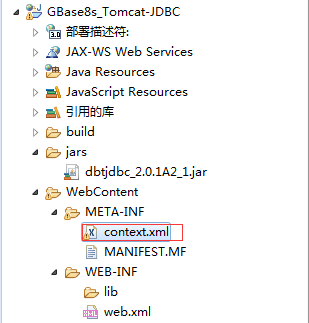
###3, 在WebContent/META-INF目录下,创建编写context.xml配置文件
 具体内容如下:
<?xml version="1.0" encoding="UTF-8"?>
<Context>
	<Resource name="jdbc/gbase01_jdbc"
		auth="Container"
		type="javax.sql.DataSource"
		factory="org.apache.tomcat.jdbc.pool.DataSourceFactory"
		maxActive="10"
        initialSize="5"
        jdbcInterceptors="org.apache.tomcat.jdbc.pool.interceptor.ConnectionState;
        	org.apache.tomcat.jdbc.pool.interceptor.StatementFinalizer"
        validationQuery="select 1 from dual"
        testOnConnect="true"
        removeAbandoned="true"
		username="gbasedbt"
		password="GBase123"
		driverClassName="com.gbasedbt.jdbc.Driver"
		url="jdbc:gbasedbt-sqli://192.168.1.71:9088/jdbcdb:GBASEDBTSERVER=gbase01;DB_LOCALE=zh_CN.utf8;CLIENT_LOCALE=zh_CN.utf8;IFX_LOCK_MODE_WAIT=30"
	/>
</Context>
关于更多的tomcat jdbc的资源配置,参考:http://tomcat.apache.org/tomcat-7.0-doc/jdbc-pool.html ###4, 在WebContent/WEB-INF目录下,修改web.xml配置文件,增加以下内容
  <resource-ref>
	<description>TOMCAT JDBC DB Connection</description>
	<res-ref-name>jdbc/gbase01_jdbc</res-ref-name>
	<res-type>javax.sql.DataSource</res-type>
	<res-auth>Container</res-auth>
  </resource-ref>
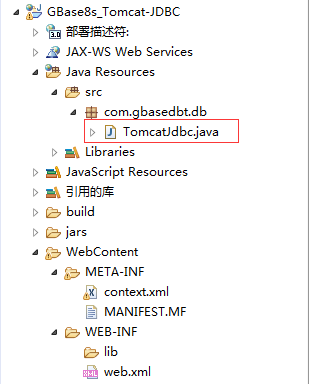
###5, 在Java Resources/src目录下,创建TomcatJdbc.java类,用于数据库连接。
 具体内容如下:
package com.gbasedbt.db;

import java.sql.Connection;
import java.sql.SQLException;

import javax.naming.InitialContext;
import javax.naming.NamingException;

import org.apache.tomcat.jdbc.pool.DataSource;

public class TomcatJdbc {

	public static Connection getConn() throws NamingException, SQLException {
		Connection connection = null;
		InitialContext context = new InitialContext();
		DataSource dataSource = (DataSource)context.lookup("java:/comp/env/jdbc/gbase01_jdbc");
		connection = dataSource.getConnection();
		return connection;
	}

}
###6, 在WebContent目录下,创建编写testTomcatJdbc.jsp动态网页文件
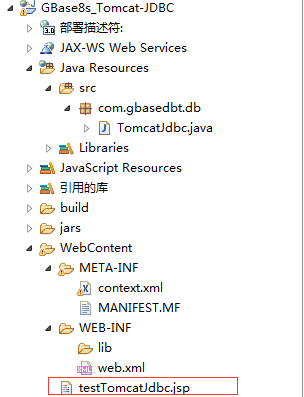 内容如下:
内容如下:
<!DOCTYPE HTML PUBLIC "-//W3C//DTD HTML 4.01 Transitional//EN">
<%@page import="com.gbasedbt.db.TomcatJdbc"%>
<%@page import="java.sql.SQLException"%>
<%@page import="java.sql.ResultSet"%>
<%@page import="java.sql.Statement"%>
<%@page import="java.sql.Connection"%>
<html>
<head>
<%@ page language="java" contentType="text/html; charset=UTF-8"
    pageEncoding="UTF-8"%>
<meta http-equiv="Content-Type" content="text/html; charset=UTF-8">
<title>使用Tomcat Jdbc Pool连接到GBase 8s数据库</title>
</head>
<body>
<p>使用Tomcat Jdbc Pool连接到GBase 8s数据库</p>
<%
	Connection connection = null;
	Statement statement = null;
	ResultSet resultSet = null;
	try{
		connection = TomcatJdbc.getConn();
		statement = connection.createStatement();
		resultSet  = statement.executeQuery("select first 10 tabname from systables");
		while(resultSet.next()){
			out.println("表名: " + resultSet.getString(1) + "<br>");
		}

	} catch (SQLException e){
		e.printStackTrace();
	} finally {
		if(resultSet != null){
			try{
				resultSet.close();
			} catch (Exception e){}
		}
		if(statement != null){
			try{
				statement.close();
			} catch (Exception e){}
		}
		if(connection != null){
			try{
				connection.close();
			} catch (Exception e){}
		}
	}
%>

</body>
</html>
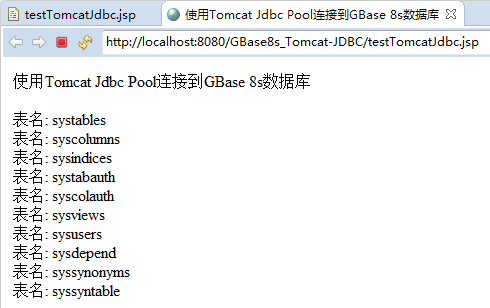
完成配置,测试数据库连接池的连接。
评论
登录后才可以发表评论

levvel发表于 1年前
我看好你哟!
nodddddd发表于 7个月前
学到了。
GBase用户47954发表于 5个月前
感谢作者的精彩分享!
崔哥发表于 4个月前
迟日江山丽,春风花草香。泥融飞燕子,沙暖睡鸳鸯。江碧鸟逾白,山青花欲燃。今春看又过,何日是归年。
热门帖子
- 12025-12-01浏览数:183859
- 22023-05-09浏览数:26535
- 42023-09-25浏览数:20220
- 52020-05-11浏览数:19000