ADO.NET连接到南大通用GBase 8s数据库
南大通用GBase 8s数据库广泛应用于各种企业级应用中,对于开发者而言,掌握如何使用ADO.NET连接到GBase 8s数据库非常重要。本文将详细阐述如何通过ADO.NET方式连接到南大通用GBase 8s数据库,并进行基本的数据库操作。
ADO.NET 方式(.net framework)连接到数据库,在开始之前,我们需要确保环境已经准备妥当。本示例使用Visual Studio 2015社区版,要求2.2.2 CSDK的配置已经完成。请确保你的开发环境已经安装了Visual Studio和必要的.NET Framework 4.5.2版本。
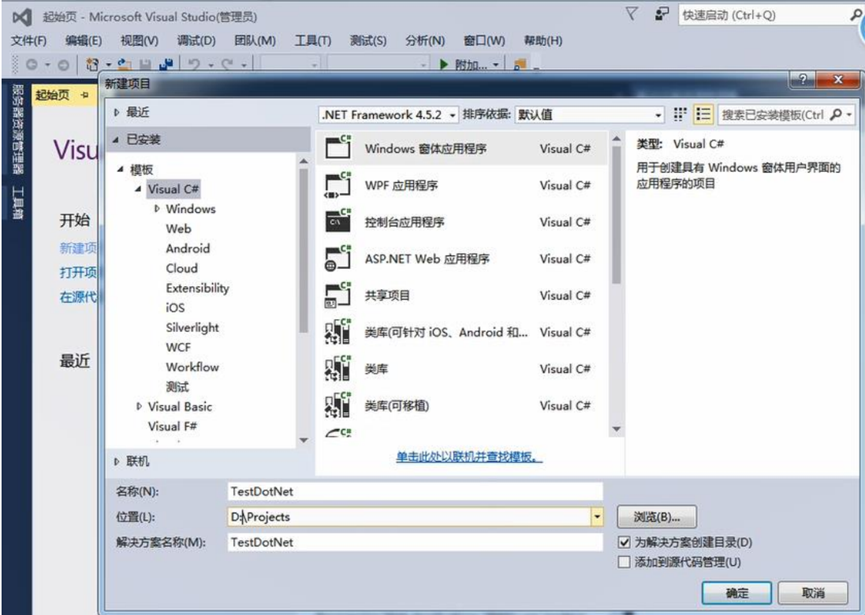
1、打开 Visual Studio,文件(F) -> 新建(N) -> 项目(P) 。
2、指定编程语言及.net framework 版本 。
使用 Visual C#, .NET Framework 4.5.2, 创建 Windows 窗体应用程序,指定项目名称 为 TestDotNet,位置等。
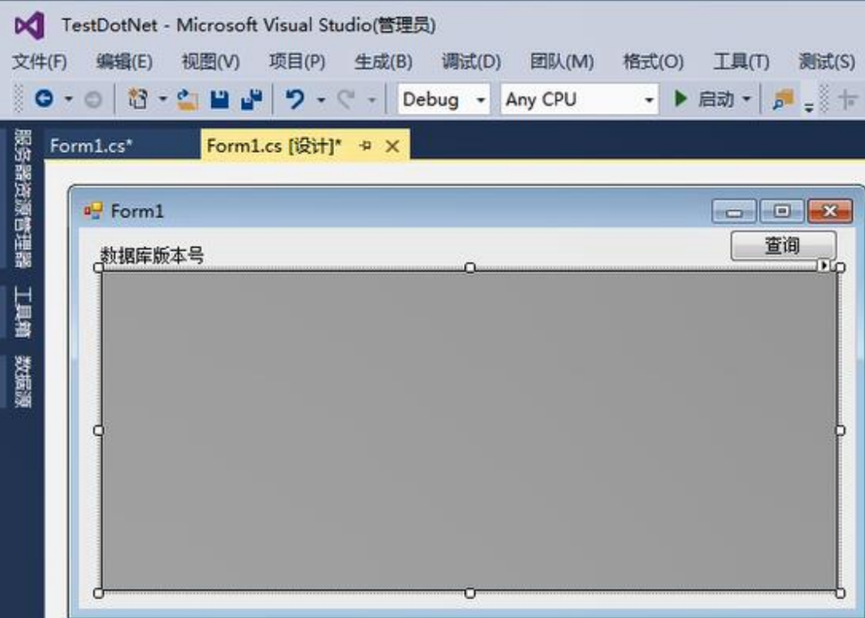
3、Form1 窗体添加工具,并调整格式。
增加一个 Label,名称为 label1;
一个 dataGridView,名称为 dataGridView1;
一个 button, 名称为 btnSelect。
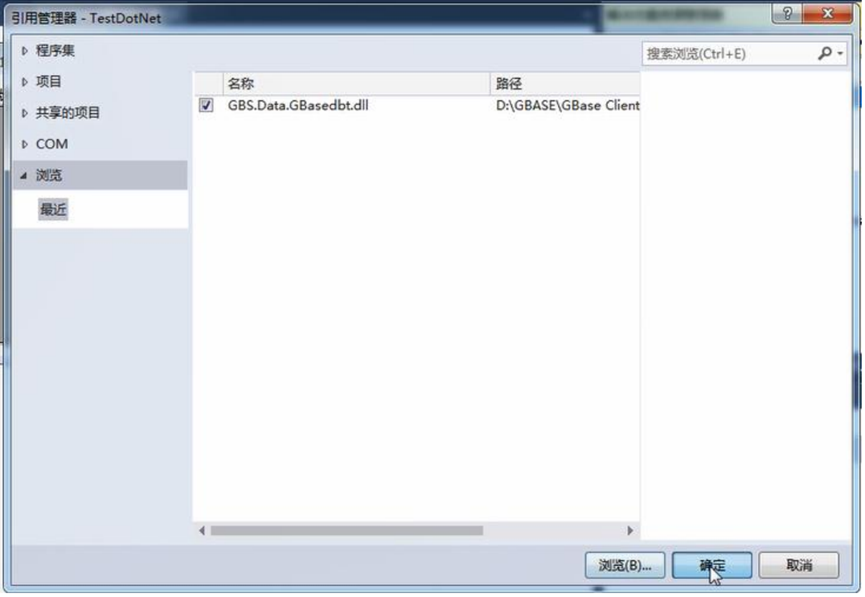
4、添加引用 GBS.Data.GBasedbt.dll
在解决方案管理器上的 引用 中 右键添加引用,浏览并增加 GBS.Data.GBasedbt.dll 文件。
示例中的路径:D:\GBASE\GBase Client-SDK\bin\netf40\GBS.Data.GBasedbt.dll。
5、增加 C#代码
将以下示例代码复制到 Form1.cs 中(视需要修改控件名称)
using System;
using System.Collections.Generic;
using System.ComponentModel;
using System.Data; u
sing System.Drawing;
using System.Linq;
using System.Text;
using System.Threading.Tasks;
using System.Windows.Forms;
using GBS.Data.GBasedbt;

namespace TestDotNet
 {
 public partial class Form1 : Form
 {
 IfxConnection ifxconn;
DataSet ds;

public Form1()
 {
 InitializeComponent();
 IfxConnectionStringBuilder build = new IfxConnectionStringBuilder();
 // 以下信息写完整,可以不使用 setnet 配置 sqlhosts
 build.Host = "bd.gbasedbt.com"; // 主机名或者 IP 地址
 build.Protocol = "onsoctcp"; // 数据库使用的协议
 build.Service = "9088"; // 数据库服务器使用的端口号
 build.Server = "gbase01"; // 数据库服务名称
 build.Database = "utf8"; // 数据库名(DBNAME)
 build.UID = "gbasedbt"; // 用户
 build.Pwd = "GBase123"; // 密码
 build.DbLocale = "zh_CN.utf8"; // 数据库字符集
 build.ClientLocale = "zh_CN.utf8"; // 客户端字符集
 build.PersistSecurityInfo = true; // 保存安全信息
 ifxconn = new IfxConnection(build.ConnectionString);
 ifxconn.Open();
 using (IfxCommand ifxcmd = ifxconn.CreateCommand())
 {
 ifxcmd.CommandText = "drop table if exists company";
 ifxcmd.ExecuteNonQuery();
 ifxcmd.CommandText = "create table company(coid serial,coname varchar(255),coaddr
varchar(255))";
 ifxcmd.ExecuteNonQuery();
 ifxcmd.CommandText = "insert into company values (0,'南大通用','天津市海泰绿色产业基地')";
 ifxcmd.ExecuteNonQuery();
 ifxcmd.CommandText = "insert into company values (0,'南大通用北京分公司','北京市朝阳区太阳宫
')";
 ifxcmd.ExecuteNonQuery();
 ifxcmd.CommandText = "update company set coaddr = '天津市普天创新园' where coid = 1";
 ifxcmd.ExecuteNonQuery();
 ifxcmd.CommandText = "select dbinfo('version','full') from dual";
 IfxDataReader dr = ifxcmd.ExecuteReader();
 if (dr.Read())
 {
 this.label1.Text = "数据库版本号为: " + dr[0];
 }
 }
}
private void btnSelect_Click(object sender, EventArgs e)
 {
 IfxDataAdapter ifxadpt = new IfxDataAdapter("select * from company", ifxconn);
 ds = new DataSet();
 ifxadpt.Fill(ds);
 this.dataGridView1.DataSource = ds.Tables[0];
 MessageBox.Show("DotNet 方式操作数据库成功! \n");
 }
 }
}
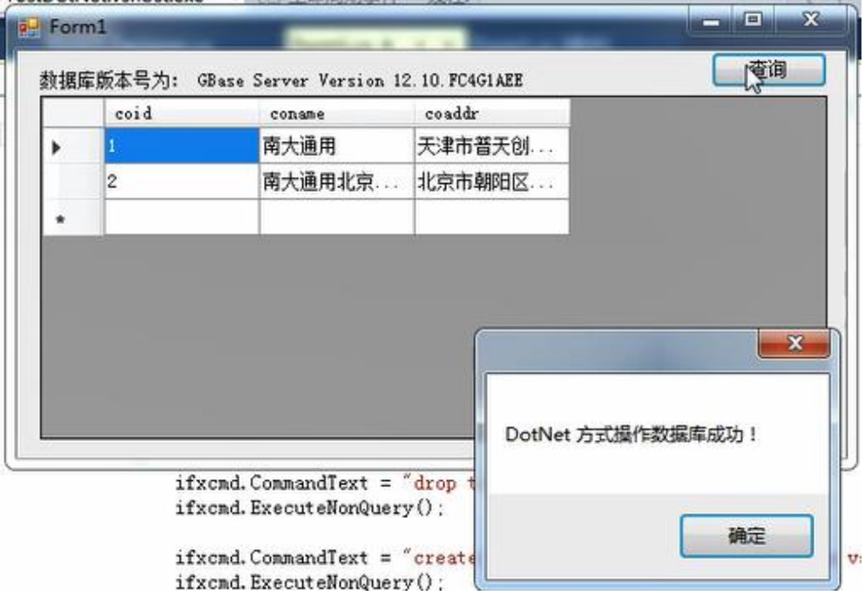
6、执行Debug 测试连接到数据库结果。
所有的软件都使用了 64 位的,故 Debug 也使用 x64,如果使用的是 32 位的 CSDK,则 选择 x86。

出现 Form1 界面后,点击查询,将显示 company 表记录及弹出框提示成功。
通过本文的详细步骤,希望您能掌握了如何使用ADO.NET连接到南大通用GBase 8s数据库,并进行基本的数据库操作。感谢阅读本文,如果你有任何疑问或建议,欢迎在评论区留言。我们期待与你一起探讨技术,共同进步。
评论


{
try
{
IfxConnectionStringBuilder build = new IfxConnectionStringBuilder();
// 以下信息写完整,可以不使用 setnet 配置 sqlhosts
build.Host = "192.168.2.184"; // 主机名或者 IP 地址
build.Protocol = "onsoctcp"; // 数据库使用的协议
build.Service = "9088"; // 数据库服务器使用的端口号
build.Server = "gbase01"; // 数据库服务名称
build.Database = dbName; // 数据库名(DBNAME)
build.UID = "gbasedbt"; // 用户
build.Pwd = "GBase@123"; // 密码
build.DbLocale = "zh_CN.utf8"; // 数据库字符集
build.ClientLocale = "zh_CN.utf8"; // 客户端字符集
build.PersistSecurityInfo = true; // 保存安全信息
var conn = new IfxConnection(build.ConnectionString);
conn.Open();
return conn;
}
catch (Exception ex)
{
Console.WriteLine($"连接失败:{ex.Message}");
throw ex;
}
}
执行连接报错:System.IO.IOException:“SQL0035N The file "zh_cn\GBS.Data.GBasedbt.xml" cannot be opened.”
热门帖子
- 12025-12-01浏览数:182763
- 22023-05-09浏览数:25060
- 42023-09-25浏览数:18525
- 52020-05-11浏览数:17529