GBase 8s
其他
问答
急需,我现在需要连接navicat客户端。急需回答。
发表于2025-04-07 14:04:08408次浏览12个评论
为提高效率,提问时请提供以下信息,问题描述清晰可优先响应。
【GBase版本】::gbase8s我也不太清楚好像是V8.8
【操作系统】::[root@gbase-rss ~]# uname -a
Linux gbase-rss 3.10.0-1160.el7.x86_64 #1 SMP Mon Oct 19 16:18:59 UTC 2020 x86_64 x86_64 x86_64 GNU/Linux
[root@gbase-rss ~]#
【CPU】:
【问题描述】*:我现在连接navicat客户端的时候怎么配置远程连接权限,以及创建新用户用于连接的用户他需要什么权限,需不需要在gbase8s数据库上授权就是给权限,使用什么命令,可以发个文档吗,以及3台服务器都要创建这个用户吗还是只是主创建就可以了。
评论
登录后才可以发表评论

路路路发表于 1年前
稍等~

GBase用户137发表于 1年前
只需要主节点创建就可以。
在修改远程配置连接重启数据库生效后,可以直接创建一个sysadmin用户:CREATE USER user_name SYSADMIN PASSWORD ‘passwordxxx’;
在修改远程配置连接重启数据库生效后,可以直接创建一个sysadmin用户:CREATE USER user_name SYSADMIN PASSWORD ‘passwordxxx’;
GBase用户27057发表于 1年前
@GBase用户137:不行啊,我是这样操作的先进入数据库gsql -d postgres -p 15432
然后执行下面的命令
[gbase@gbase-primary tools]$ gsql -d postgres -p 15432
gsql ((single_node GBase8sV8.8 3.0.0B69 build a8badbbd) compiled at 2023-03-31 16:41:35 commit 0 last mr 1110 )
Non-SSL connection (SSL connection is recommended when requiring high-security)
Type "help" for help.
postgres=# CREATE USER test WITH PASSWORD '123.COMcom';
CREATE ROLE
postgres=# CREATE DATABASE testdb WITH OWNER test;
CREATE DATABASE
postgres=# GRANT ALL PRIVILEGES ON DATABASE testdb TO test;
GRANT
postgres=# 我没有重启感觉不用重启,然后我去navicat连接的时候他一直连不上,我选择地址没错是10.225.20.68然后初始数据库是testdb然后用户密码是test为什么连不上呀
然后执行下面的命令
[gbase@gbase-primary tools]$ gsql -d postgres -p 15432
gsql ((single_node GBase8sV8.8 3.0.0B69 build a8badbbd) compiled at 2023-03-31 16:41:35 commit 0 last mr 1110 )
Non-SSL connection (SSL connection is recommended when requiring high-security)
Type "help" for help.
postgres=# CREATE USER test WITH PASSWORD '123.COMcom';
CREATE ROLE
postgres=# CREATE DATABASE testdb WITH OWNER test;
CREATE DATABASE
postgres=# GRANT ALL PRIVILEGES ON DATABASE testdb TO test;
GRANT
postgres=# 我没有重启感觉不用重启,然后我去navicat连接的时候他一直连不上,我选择地址没错是10.225.20.68然后初始数据库是testdb然后用户密码是test为什么连不上呀
GBase用户137发表于 1年前
@GBase用户27057:需要重启的。因为远程连接配置修改的参数,重启后生效。
此外,参数生效后,再创建用户。
此外,参数生效后,再创建用户。
GBase用户27057发表于 1年前
@GBase用户137:我远程连接配置参数没有改呀,因为我看了一下文档中的命令我全部执行了一下,好像都不用改,一会我发给您看一下,远程配置权限需要改东西吗。
GBase用户137发表于 1年前
@GBase用户27057:gs_guc reload -N all -I all -h "host all all 0.0.0.0/0 sha256"
gs_guc reload -N all -I all -c "listen_addresses='*'"
gs_guc reload -N all -I all -c "password_encryption_type=1"
执行这三条之后就需要重启,这三条命令修改了postgresql.conf和pg_hba.conf配置文件里的参数
gs_guc reload -N all -I all -c "listen_addresses='*'"
gs_guc reload -N all -I all -c "password_encryption_type=1"
执行这三条之后就需要重启,这三条命令修改了postgresql.conf和pg_hba.conf配置文件里的参数
GBase用户27057发表于 1年前
@GBase用户137:这3条命令我重启了我现在还是连接不上这里的原因吗您看看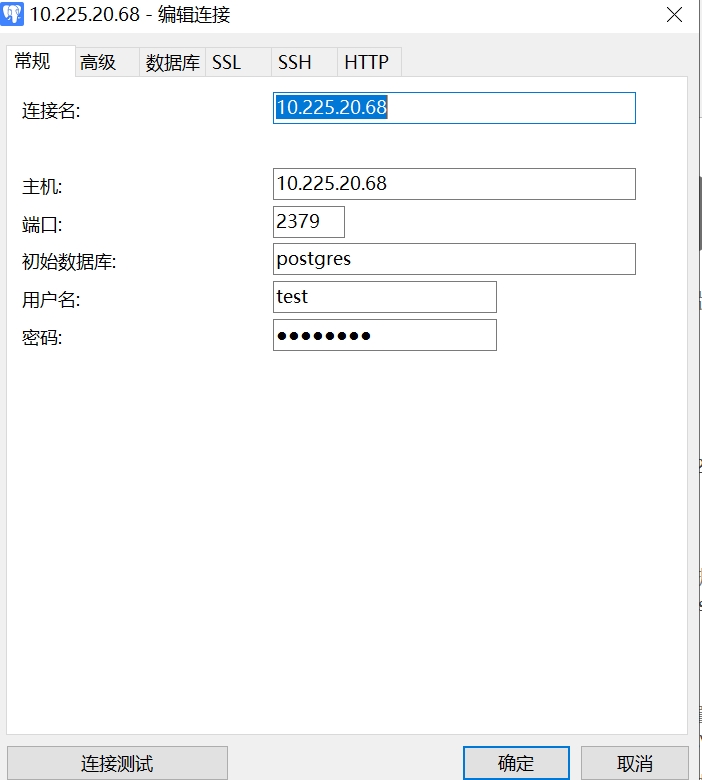
GBase用户27057发表于 1年前
@GBase用户137:这3个命令都执行了。
[gbase@gbase-primary ~]$ gs_guc reload -N all -I all -h "host all all 0.0.0.0/0 sha256"
The gs_guc run with the following arguments: [gs_guc -N all -I all -h host all all 0.0.0.0/0 sha256 reload ].
Begin to perform the total nodes: 3.
Popen count is 3, Popen success count is 3, Popen failure count is 0.
Begin to perform gs_guc for datanodes.
Command count is 3, Command success count is 3, Command failure count is 0.
Total instances: 3. Failed instances: 0.
ALL: Success to perform gs_guc!
还有这个
[gbase@gbase-primary ~]$ gs_guc reload -N all -I all -c "listen_addresses='*'"
The gs_guc run with the following arguments: [gs_guc -N all -I all -c listen_addresses='*' reload ].
Begin to perform the total nodes: 3.
Popen count is 3, Popen success count is 3, Popen failure count is 0.
Begin to perform gs_guc for datanodes.
Command count is 3, Command success count is 3, Command failure count is 0.
Total instances: 3. Failed instances: 0.
ALL: Success to perform gs_guc!
[gbase@gbase-primary ~]$ gsql -d postgres -p 15432
gsql ((single_node GBase8sV8.8 3.0.0B69 build a8badbbd) compiled at 2023-03-31 16:41:35 commit 0 last mr 1110 )
Non-SSL connection (SSL connection is recommended when requiring high-security)
Type "help" for help.
postgres=# show password_encryption_type;
password_encryption_type
--------------------------
1
(1 row)
postgres=# gs_guc reload -N all -I all -c "password_encryption_type=1"
postgres-# \q
[gbase@gbase-primary ~]$ gha_ctl stop all -l http://10.225.20.68:2379
{
"ret":0,
"msg":"Success"
}
[gbase@gbase-primary ~]$ gha_ctl start all -l http://10.225.20.68:2379
{
"ret":0,
"msg":"Success"
}我都stop停止和start启动了代表重启了,为什么还是连接不上呢。
[gbase@gbase-primary ~]$ gs_guc reload -N all -I all -h "host all all 0.0.0.0/0 sha256"
The gs_guc run with the following arguments: [gs_guc -N all -I all -h host all all 0.0.0.0/0 sha256 reload ].
Begin to perform the total nodes: 3.
Popen count is 3, Popen success count is 3, Popen failure count is 0.
Begin to perform gs_guc for datanodes.
Command count is 3, Command success count is 3, Command failure count is 0.
Total instances: 3. Failed instances: 0.
ALL: Success to perform gs_guc!
还有这个
[gbase@gbase-primary ~]$ gs_guc reload -N all -I all -c "listen_addresses='*'"
The gs_guc run with the following arguments: [gs_guc -N all -I all -c listen_addresses='*' reload ].
Begin to perform the total nodes: 3.
Popen count is 3, Popen success count is 3, Popen failure count is 0.
Begin to perform gs_guc for datanodes.
Command count is 3, Command success count is 3, Command failure count is 0.
Total instances: 3. Failed instances: 0.
ALL: Success to perform gs_guc!
[gbase@gbase-primary ~]$ gsql -d postgres -p 15432
gsql ((single_node GBase8sV8.8 3.0.0B69 build a8badbbd) compiled at 2023-03-31 16:41:35 commit 0 last mr 1110 )
Non-SSL connection (SSL connection is recommended when requiring high-security)
Type "help" for help.
postgres=# show password_encryption_type;
password_encryption_type
--------------------------
1
(1 row)
postgres=# gs_guc reload -N all -I all -c "password_encryption_type=1"
postgres-# \q
[gbase@gbase-primary ~]$ gha_ctl stop all -l http://10.225.20.68:2379
{
"ret":0,
"msg":"Success"
}
[gbase@gbase-primary ~]$ gha_ctl start all -l http://10.225.20.68:2379
{
"ret":0,
"msg":"Success"
}我都stop停止和start启动了代表重启了,为什么还是连接不上呢。
GBase用户137发表于 1年前
@GBase用户27057:重启后,重新创建具有sysadmin权限的用户,之前创建的那个test用户不能用。
最佳回答
GBase用户27057发表于 1年前
@GBase用户137:您帮我看一下我那样操作可以吗,需要在linux上也创建这个test用户吗,我linux上已经创建test用户了为什么我数据库执行下面的操作我还是连不上navicat呢。初始数据库选testdb还是postgres呢,因为我有一个操作是 CREATE DATABASE testdb WITH OWNER test;
GBase用户137发表于 1年前
@GBase用户27057:不需要在创建test同名的操作系统用户了。当前问题跟连接的数据库是哪个也没有关系。需要重启数据库操作,因为现在修改的参数没有生效
崔哥发表于 5个月前
恻恻轻寒翦翦风,小梅飘雪杏花红。夜深斜搭秋千索,楼阁朦胧烟雨中。
热门帖子
- 12025-12-01浏览数:182765
- 22023-05-09浏览数:25067
- 42023-09-25浏览数:18527
- 52020-05-11浏览数:17529