
GBase News
Oracle connects to GBase 8a MPP Cluster via dblink
Explanation
GBase 8a MPP Cluster is a large-scale distributed analytical database independently developed by Company. Due to its features such as column storage, compression, intelligent indexing, and distributed computing, it performs excellently in statistical analysis scenarios. So how can the data analyzed by the GBase 8a database be returned to the Oracle database for further processing? This is a question raised by many customers. Here we introduce the operation method of connecting GBase 8a MPP Cluster through Oracle's dblink, hoping to help customers with such needs.
Thanks to IT friend Xiao Chen (online name chenoracle) for summarizing and organizing!
For the original text, please see ITPUB blog: http://blog.itpub.net/29785807/viewspace-2691054/
The content of the article has been tested in the following environment:
Source:
Oracle version: Oracle 11.2.0.3.0
OS version: Redhat 7.5 IP:192.168.38.20
Target:
GBase version: GBase8a_MPP_Cluster-NoLicense-FREE-8.6.2_build43-R7
OS version: Redhat 7.5 IP:192.168.38.10
Related keywords: GBase 8a MPP Cluster, dblink, oracle, data migration
I. Install gateway on Oracle side
Note: Oracle 11.2.0.3.0 has gateway installed by default
[oracle@cjcos02 hs]$ pwd
/u01/app/oracle/product/11.2.0/db_1/hs
Check gateway information
[oracle@cjcos02 hs]$ dg4odbc
Oracle Corporation --- SATURDAY MAY 09 2020 15:07:10.503
Heterogeneous Agent Release 11.2.0.3.0 - 64bit Production Built with
Oracle Database Gateway for ODBC
II. Install GBase ODBC on Oracle side
GBase ODBC download address:
http://www.gbase8a.com/forum.php?mod=viewthread&tdtype=document&tid=1319
Installation:
[root@cjcos02 odbc]# rpm -ivh GBaseODBC-8.3.81.53-build53.17-redhat7-x86_64.rpm
Preparing... ################################# [100%]
Updating / installing...
1:gbaseodbc-8.3-53.17 ################################# [100%]
III. Configure odbcinst.in on Oracle side
[root@cjcos02 odbc]# vim /etc/odbcinst.ini
[GBase ODBC 8.3 Driver]
Driver=/usr/lib64/libgsodbc8.so
UsageCount=1
DontDLClose=1
Threading=0
IV. Configure GBase ODBC data source on Oracle side
4.1 Check configuration file location
[root@cjcos02 odbc]# odbcinst -j
unixODBC 2.3.1
DRIVERS............: /etc/odbcinst.ini
SYSTEM DATA SOURCES: /etc/odbc.ini
FILE DATA SOURCES..: /etc/ODBCDataSources
USER DATA SOURCES..: /root/.odbc.ini
SQLULEN Size.......: 8
SQLLEN Size........: 8
SQLSETPOSIROW Size.: 8
4.2 Configure odbc.in
[root@cjcos02 odbc]# vim /etc/odbc.ini
[gbase]
Description = ODBC for GBase
Driver = GBase ODBC 8.3 Driver
Server = 192.168.38.10
Port = 5258
UID = cjc
Password = cjc
Database = cjcdb
V. Verify ODBC connection
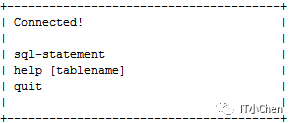
[root@cjcos02 odbc]# isql gbase
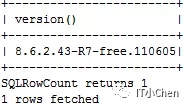
SQL> select version();
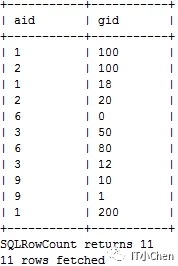
SQL> select * from t1;
VI. Configure tnsnames.ora
[oracle@cjcos02 ~]$ cd $ORACLE_HOME/network/admin
[oracle@cjcos02 admin]$ vim tnsnames.ora
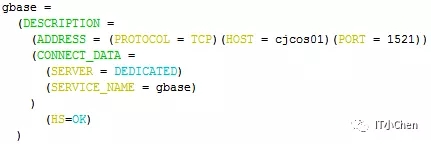
[oracle@cjcos02 admin]$ tnsping gbase

VII. Configure listener.ora
[oracle@cjcos02 admin]$ vim listener.ora
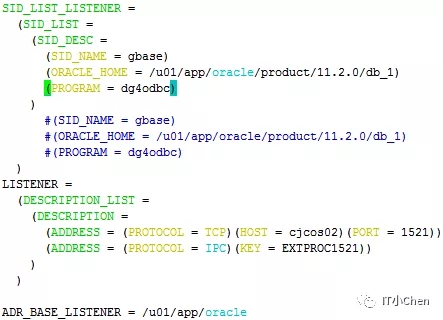
[oracle@cjcos02 admin]$ lsnrctl reload

[oracle@cjcos02 admin]$ lsnrctl status
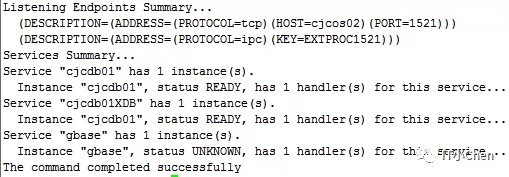
VIII. Configure initgbase.ora
[oracle@cjcos02 admin]$ pwd
/u01/app/oracle/product/11.2.0/db_1/hs/admin
[oracle@cjcos02 admin]$ vim initgbase.ora
HS_FDS_CONNECT_INFO = gbase
HS_FDS_TRACE_LEVEL = 0
HS_FDS_SHAREABLE_NAME=/usr/lib64/libodbc.so
HS_FDS_SUPPORT_STATISTICS=FALSE
HS_LANGUAGE=AMERICAN_AMERICA.WE8ISO8859P15
set ODBCINI = /etc/odbc.ini
IX. Create dblink
SQL> create public database link gbase connect to "cjc" identified by "cjc" using 'gbase';
Database link created.
X. Verify data
Oracle side:
[oracle@cjcos02 ~]$ sqlplus / as sysdba
SQL> select * from t1@gbase;
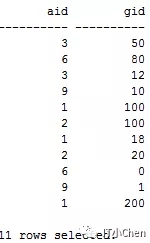
GBase side:
[gbase@cjcos01 ~]$ gccli -ucjc -p
gbase> use cjcdb;
gbase> select * from t1;
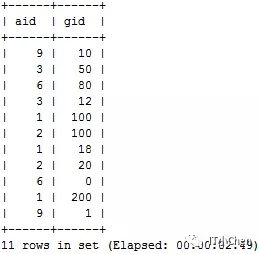
XI. Common errors
The following errors are generally due to initgbase.ora configuration issues, adding the HS_FDS_SHAREABLE_NAME parameter can solve them.
SQL> select * from t1@gbase;
select * from t1@gbase
*
ERROR at line 1:
ORA-28500: connection from ORACLE to a non-Oracle system returned this message:
ORA-02063: preceding line from GBASE
When Oracle stops the database, it reports error ORA-01097. After switching sessions, the previous session will automatically commit or rollback, then execute the stop database command again.
SQL> shutdown immediate
ORA-01097: cannot shutdown while in a transaction - commit or rollback first
Switch session
SQL> conn / as sysdba
Connected.
SQL> shutdown immediate
Database closed.
Database dismounted.
ORACLE instance shut down.
The above is the operation instructions for Oracle connecting to GBase 8a MPP Cluster via dblink, hoping to help users with this need.